
Thank you for subscribing to our email newsletter!
As you many already know, most email companies are now using programs to block unwanted e-mail, often called spam. This is great because it helps minimize the garage that seems to clog our inboxes these days. However, sometimes these programs block email messages you actually want to receive.
Why is this important?
Unsolicited, unwanted bulk advertising email, commonly known as “spam”, has become a big problem. It’s reached such proportions that most email services and Internet Service Providers (ISPs) have put some sort of blocking or filtering system in place or begun relying on self-proclaimed blacklists to tell the good guys from the bad guys.
We applaud their intention to protect you from spam since we hate it just as much as everyone else! Unfortunately, the current tools and systems for stopping spam are far from a perfect solution. They often block email that you’ve requested but fits somebody else’s idea of what spam looks like. The more responsible anti-spam activists are working hard to cut down on these “false positives”, but in the meantime, you might unexpectedly be in the situation where you are not receiving your requested email newsletters from us!
As it happens, there’s something you can do to keep your subscription’s content from falling into the false positive trap. You can fight the spam “blacklists” with a “whitelist”.
Whitelist us now, before your delivery is interrupted.
This is important – BE SURE to add the corresponding PaulManoian.com email addresses to your email whitelist to ensure the best chance of receiving our content and updates. If you don’t, you may stop receiving them and nobody (including us) will ever know!
A whitelist is a list of accepted items or persons in a set…. a list of e-mail addresses or domain names from which an e-mail blocking program will allow messages to be received.
Every email system is different, but we have provided instructions for some of the more popular ones below. If your email provider is not listed here, please contact your ISP’s customer service team and request instructions. Also, if you’re using some sort of spam filtering or blocking software on your own in addition to what your ISP provides, you will need to add us to it as well. We have also included some instructions on how to exempt your subscription from some of the more popular spam filtering programs.
The detailed instructions below are for email from newsletter@paulmanoian.com. But, the steps are the same to whitelist info@paulmanoian.com or anything other email address.
Gmail:
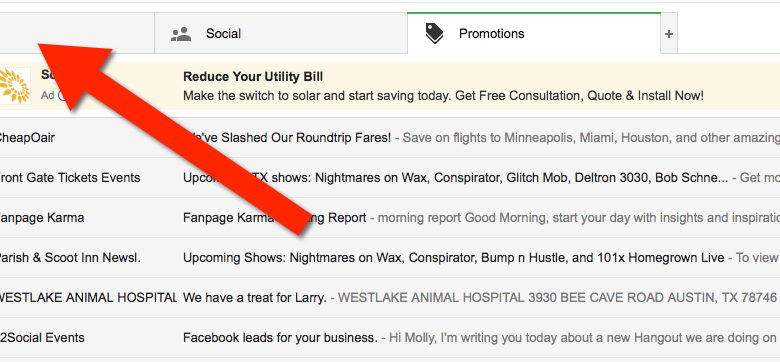
1. In your inbox, locate an email from newsletter@paulmanoian.com
2. Drag this email to the “primary” tab of your inbox.

3. You’ll see that our emails will go to your primary folder in the future!
Yahoo! Mail
When opening an email message, a “+” symbol should display next to From: and the sender’s name. Select this and an “Add to contacts” pop-up should appear. Select “Save”:

Mac Mail
Select “Mail” and “Preferences” from the top menu.

In the “Preferences” window, click the “Rules” icon.
Click the “Add Rule” button.

In the “Rules” window, type a name for your rule in the “Description” field.
Use the following settings: “If any of the following conditions are met: From Contains.”
Type the sender’s email address in the text field beside “Contains.”

Select “Move Message” and “Inbox” from the drop-down menus.Click “Ok” to save the rule.
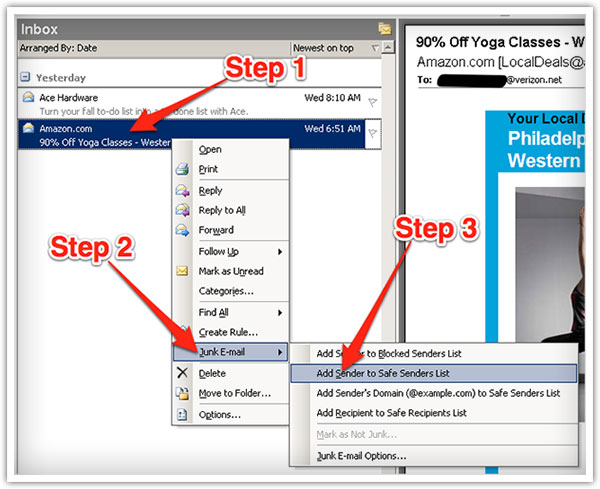
Outlook 2003 & Later
Right-click on the message in your inbox.
Select “Junk E-mail” from the menu.
Click “Add Sender to Safe Senders List.”
AOL Webmail
- From your mailbox screen click on the drop down arrow to the right of the ‘Mail Options’ and then click on Address Book.
- Click the Add button (Add Contact for version 8.0).
- Type the following email address into the ‘Screen Name’ box and then click Save: newsletter@paulmanoian.com
Hotmail/Outlook.com
- Open one of your daily newsletters (or this message)
- Click add to contacts next to newsletter@paulmanoian.com.
Other Email Service Providers
- Add the following email address to your Address Book or Contacts: newsletter@paulmanoian.com
- For instructions that are specific to your email provider or ISP, please contact your email provider or ISP directly.